PRIVATE AI INFRASTRUCTURE

Own yourintelligence.

Private AI infrastructure. Built around your business. On-premises models, knowledge and workflows inside a defined environment.

Local models and approved knowledgeHardware matched to the workloadA defined path from pilot to operation
AI STATION / LOCAL NODE SCOPED ENVIRONMENT
DATADATA · RAG
MODELMODEL · LLM
TEAMPEOPLE · ROLES
RUNTIMERUNTIME · API
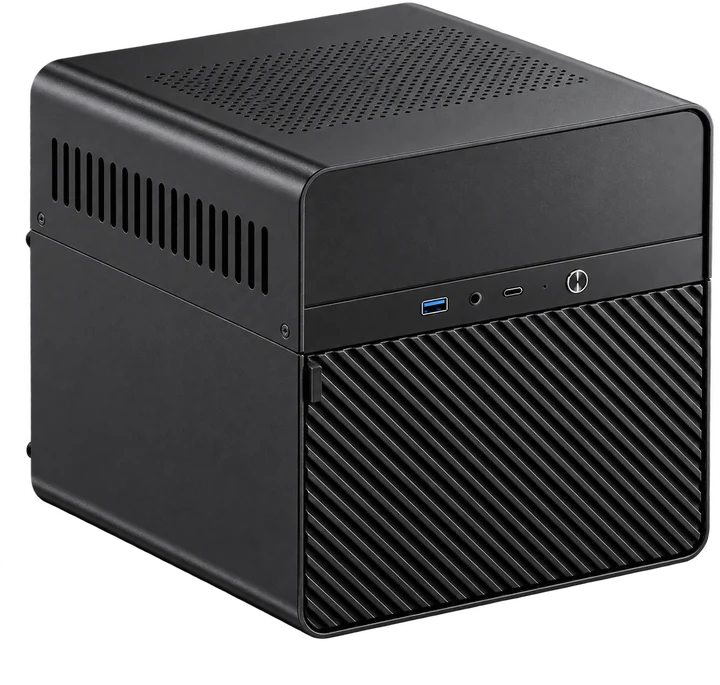
NEUROSERVER AI Station — reference local AI workstation NEUROSERVER
AI STATION
PRIVATE AI INFRASTRUCTURE Hardware, local models, knowledge and access designed as one working environment. Explore the AI Station
DATA / MODELS / ACCESSPRIVATE AI
02 / LOCAL AI SYSTEM

One working system
from connected layers.

We define users, data, models and operating needs first. Hardware, runtime, knowledge, access and handover then form a coherent deployment.

WORKING ARCHITECTURE / FIVE CONNECTED LAYERS
WORKING AI ENVIRONMENTNEUROSERVERhardware · models · knowledge
01Hardwarestation · GPU · server
02Models & runtimeLLM · runtime
03Knowledge / RAGsources · index
04Access & applicationspermissions · APIs
05 / HANDOVERVerify & hand over
  1. 01

    Hardware

    Choose a station or project-specific GPU system around model size, memory, concurrent use and space. The team gets a scoped platform.

  2. 02

    Models and runtime

    Prepare compatible models, drivers and runtime; record the tested configuration so the team knows what is installed.

  3. 03

    Knowledge and RAG

    Prepare approved sources, index and retrieval with refresh and access rules. Users get source-linked answers to evaluate.

  4. 04

    Access and applications

    Scope interfaces and connectors, separating read access, permitted actions and approval points.

  5. 05

    Verify and hand over

    Test agreed tasks, record limits and give the team configuration, documentation and an operating plan.

OUTCOME

A working private AI environment with equipment, software, knowledge and responsibilities agreed together.

03 / AI STATIONREFERENCE PLATFORM
NEUROSERVER AI Station reference enclosure
NEUROSERVER AI STATIONlocal workstation for a defined team pilot
03 / NEUROSERVER AI STATION

NEUROSERVERAI Station

A compact local AI workstation reference for models, private RAG, development and a defined team pilot.

PLATFORMAMD Ryzen AI Max+ 395
MEMORY128 GB unified memory
STORAGE2 TB NVMe SSDReference configuration

Unified memory is a shared pool, not 128 GB RAM plus another 128 GB of dedicated VRAM. Memory available to a model depends on system and runtime allocation.

PILOT WORKLOADS
  • Local language models
  • Private RAG and documents
  • Development assistance
  • Scoped team workflows
  • EnvironmentPrepare drivers, runtime and selected models for the target platform.
  • EvaluationRun representative tasks and record measured limits on the actual configuration.
  • HandoverDocument the working setup, support scope and operating responsibilities.
Discuss an AI Station
REFERENCE

Final enclosure, components, software scope and delivery terms are confirmed in the proposal.

A WORKING ENVIRONMENTWhat the team needs around the station

Each scope item is agreed for the actual project.

  1. 01Hardware

    Platform matched to use.

  2. 02Runtime

    Drivers and dependencies.

  3. 03Models

    Selected, tested profile.

  4. 04Knowledge

    Approved sources and retrieval.

  5. 05Access

    Interfaces and permissions.

  6. 06Handover

    Evidence and operating plan.

04 / DATA PERIMETER & PRIVATE RAG

Your documents.
Answers you can check.

Private RAG retrieves relevant passages from approved knowledge, provides them to a local model as context and links the answer back to a source.

DATA PERIMETER DEFINED PATH
EXTERNAL SERVICE separate decision SOURCES documents · systems MODEL local LLM RETRIEVAL source context ACCESS project rules PRIVATEAI SYSTEM
LOCAL PATH

Source documents, index and retrieval can remain within your managed infrastructure. Access must follow each source’s permissions.

  • documents
  • knowledge bases
  • internal guides
  • reference material
  • approved sources
Document permissions, retention and refresh rules are agreed for the project.
EXTERNAL SERVICE

External APIs and update services require a deliberate data path, scoped permissions and an explicit decision about what can leave the environment.

Document and knowledge reference visualDOCUMENTS / KNOWLEDGE / SOURCES
01Sourcesguides · manuals · policies
02Prepare & indexpassages · metadata
03Retrievepermitted passages
04Model contextretrieved passages
05Answer & sourcesresponse · references
TWO CONNECTED PROCESSES
  • Prepare, index and refresh permitted documents.
  • Retrieve relevant passages for each question.
  • Give a source-linked answer for human review.
  • Respect source permissions and retention rules.

RAG does not train model weights on every document or guarantee a correct answer. Evaluate retrieval, missing evidence and difficult questions.

ILLUSTRATIVE EXAMPLE · FICTIONAL SOURCE

Approved source

Example access guide§ 2

Requesting archive access

Send the project owner your project name, intended use and requested access level. The owner approves the scope before access is granted.

Example source passage

Traceable answer

“How do I request access to the project archive?”

Contact the project owner with the project name, intended use and access level you need. Access follows approval of that scope. [1] Read source

Reference 1 · Example access guide, § 2

The supporting passage is shown here. This editorial example is not a connected knowledge base or a live AI response.

Integrations need bounded permissions, with reading and writing treated separately. Agree owners for updates, logs, backups, retention and support. Offline requirements need their own architecture and test.

05 / WORKLOADS

Put local AI
to work.

Choose a task the team already understands. Define representative inputs, useful output and evidence for the pilot.

WORKLOAD / EVALUATION PROJECT SCOPE
RAG

Less searching. More usable context.

Help employees find relevant information in manuals, policies, technical references and project files. A retrieval-based assistant can use selected passages to draft an answer and point back to the source.

START WITHA bounded collection and recurring questions.
USEFUL OUTPUTAn answer with traceable source passages.
EVALUATERetrieval relevance, source accuracy, permissions and freshness.
Discuss this workflow
WORKLOAD / EVALUATION PROJECT SCOPE
DOCS

Turn a document into a working draft.

Summarise reports, compare selected documents or extract information into a defined format. OCR and parsing can be included for scans.

START WITHRepresentative documents and an expected output.
USEFUL OUTPUTA reviewable summary, comparison or structured extraction.
EVALUATEMissing fields, numerical accuracy, tables and fidelity.
Discuss this workflow
WORKLOAD / EVALUATION PROJECT SCOPE
CODE

AI assistance close to your code.

Explore local coding assistance, repository questions and technical documentation. Match models and tools to your team’s languages and repositories.

START WITHPermitted repository material and representative tasks.
USEFUL OUTPUTDraft code, explanations, tests or documentation.
EVALUATECorrectness, test results, context limits and access.
Discuss this workflow
WORKLOAD / EVALUATION PROJECT SCOPE
VOICE

Make recordings easier to work with.

Explore local speech-to-text, transcript review and summaries for agreed audio sources. Voice interfaces and text-to-speech are separate components to qualify.

START WITHAuthorised audio samples with typical noise and languages.
USEFUL OUTPUTA searchable transcript or draft summary for review.
EVALUATEAccuracy, speakers, processing time and retention.
Discuss this workflow
WORKLOAD / EVALUATION PROJECT SCOPE
IMAGE

A local workspace for visual exploration.

Evaluate image generation and visual document workflows where suitable models and software support the selected hardware.

START WITHThe task, target resolution, input and model licences.
USEFUL OUTPUTVisual drafts or model-assisted analysis.
EVALUATEQuality, repeatability, generation time and memory.
Discuss this workflow
WORKLOAD / EVALUATION PROJECT SCOPE
SOURCE

Research with a defined source boundary.

Collect evidence from approved material and turn it into a reviewable draft. Web-connected research introduces a separate external data path.

START WITHA question, permitted sources and citation rules.
USEFUL OUTPUTA brief separating evidence, interpretation and open questions.
EVALUATESource quality, coverage, factual support and uncertainty.
Discuss this workflow
WORKLOAD / EVALUATION PROJECT SCOPE
API

Connect the workflow. Limit the actions.

Bring an assistant into a CRM, ERP, portal or support workflow where suitable APIs and permissions exist. Define read, write and approval boundaries.

START WITHOne process, relevant systems and a named owner.
USEFUL OUTPUTA drafted response, proposed action or controlled update.
EVALUATEPermissions, failures, auditability and approval.
Discuss this workflow

Model, runtime and application compatibility are checked on the selected platform. Review requirements are part of each pilot.

06 / SOFTWARE LAYER

NEUROSERVERControl Center

The software layer helps put hardware, models, runtimes and operating profiles into a clear working context.

Keep a requested setting, applied configuration, observed value and verified result distinct. Availability depends on the hardware and release; ask for a demonstration of the proposed configuration.

SystemProfilesModelsKnowledge / RAG
Ask for a current demonstration
NEUROSERVER / CONTROL CENTER LOCAL NODE / 01
ENVIRONMENT CONTEXTPROJECT SCOPE
NODEAI STATION
MODEL LAYERLOCAL LLM
KNOWLEDGERAG / SCOPED
WORKLOAD PROFILEconceptual view
MODELProfile to be agreed
KNOWLEDGE / RAGTo be scoped
PROFILESProject scope
Interface scope depends on the platform and release.CONCEPTUAL INTERFACE
CONCEPTUAL INTERFACE

This diagram explains the roles of the control layer. It is not live telemetry or proof of a shipped function.

07 / HARDWARE & SCALE

The right form
for the workload.

Start with a compact station, larger enclosure or knowledge storage. GPU workstations and servers are project-specific expansion paths.

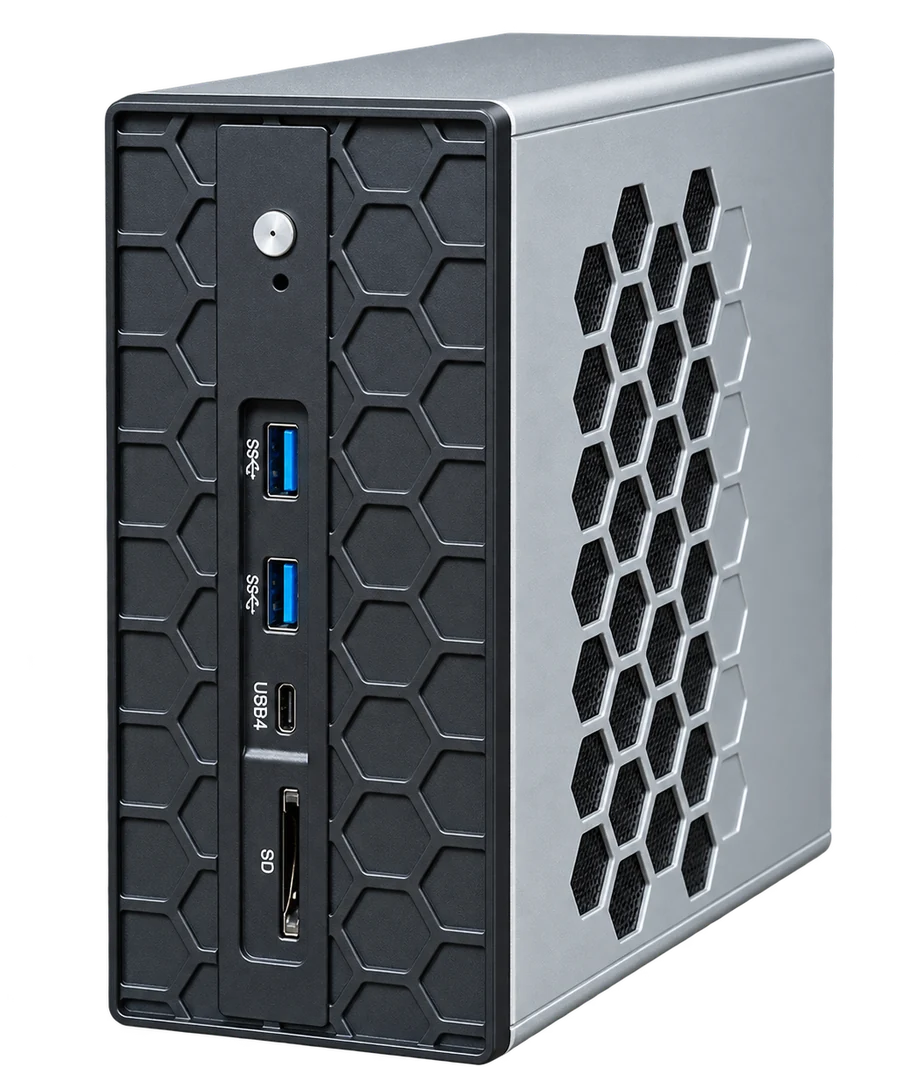
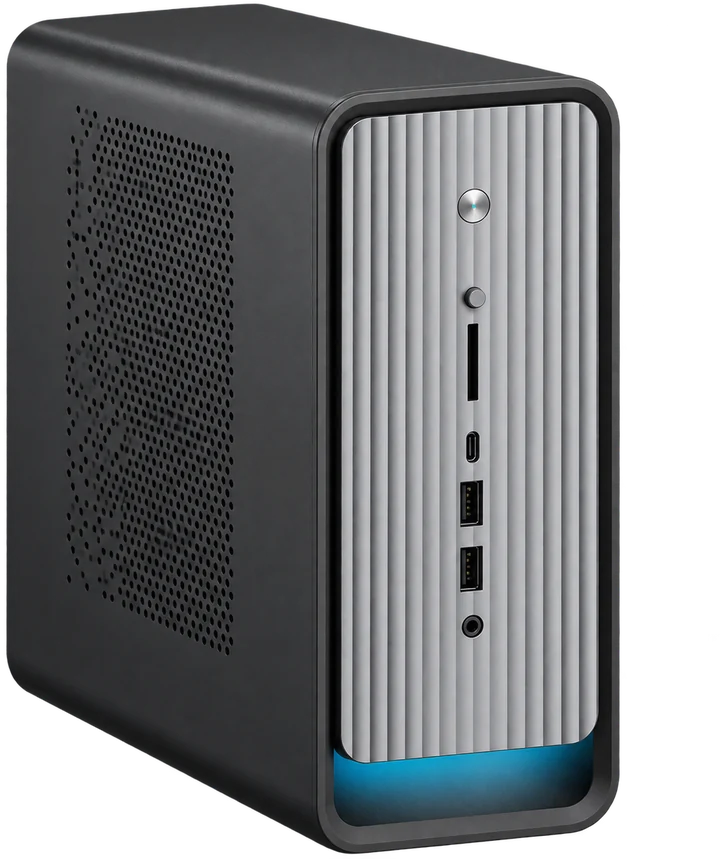
Images and configurations are references. Final enclosure, components, ports and software scope are confirmed in the proposal.

  1. 01AI Stationpilot · small team

    Local models and a first working use case.

  2. 024L AI Stationlarger enclosure

    Configure chassis, power and interfaces around the task.

  3. 03AI NASstorage · knowledge

    Scope sources, index and knowledge storage.

  4. 04GPU systemsproject-specific

    Dedicated GPU workstations and servers for measured demands.

  5. 05Infrastructurecompute · storage · access

    Expand around validated needs; nodes do not automatically pool memory.

08 / FROM PILOT TO OPERATION

More than
hardware.

Hardware, software, knowledge and a useful task are scoped together. The team gets a tested configuration and an operating plan.

01Hardwarestation · GPU · storage
02Runtimemodels · dependencies
03Knowledgesources · retrieval
04Accesspermissions · integrations
05Handovertests · support scope
DEPLOYMENT PATH

One useful pilot.
A clear next step.

Agree the evidence that will justify deployment, then work through a defined sequence.

  1. 01

    Define the task

    Users, source material and representative work. Output: workload brief and acceptance criteria.

  2. 02

    Map constraints

    Data, access, infrastructure and software dependencies. Output: hardware and software scope.

  3. 03

    Build the pilot

    Prepare the environment and only the sources and actions in scope. Output: testable configuration.

  4. 04

    Evaluate

    Answer quality, latency, concurrent use and limits. Output: evidence and deployment decision.

  5. 05

    Hand over

    Document configuration, owners and support. Output: operating plan and next expansion step.

09 / QUESTIONS & ANSWERS

Before
you start.

The practical questions behind a private AI deployment.

It is an AI environment whose hardware, model execution, data access and operating rules are controlled for your organisation. It can include a local workstation, a server, internal knowledge retrieval and integrations. The actual privacy boundary comes from the architecture and configuration, not the name of the product.

No. On-premises describes where the system runs. Initial model downloads, updates, external connectors or cloud services may still require a connection. An offline or air-gapped environment needs those dependencies to be reviewed and an agreed update process tested separately.

Compatibility depends on the model architecture, format, quantization, memory needs, context length, runtime and hardware support. We select candidates for the task and validate them on the intended configuration. A model fitting into memory is not a guarantee of a useful response time.

No. Unified memory is shared by the system, including the CPU and integrated graphics. The operating system, runtime and other processes use part of it. Model weights, context and runtime allocations must fit within the available budget. See the reference configuration and memory explanation.

A private RAG workflow can be scoped around approved documents and knowledge sources. Preparation includes parsing, indexing, refresh rules and access control. Supported formats and connectors are confirmed with representative files; scans and complex tables may need additional processing.

Not necessarily. RAG retrieves passages from your collection and includes them as context for a request, without retraining the model for each document. Fine-tuning serves a different purpose, such as adapting behaviour or output format. The task determines whether it is useful.

No. It can improve access to relevant source material and make references visible, but a model can still omit, misinterpret or invent information. Evaluation should include difficult questions, missing evidence and access restrictions, with human review where consequences require it.

A shared environment can be designed, but useful capacity depends on simultaneous requests, model size, context and response-time expectations. The pilot should test the expected usage pattern. A user count alone is not enough to size the hardware.

Where suitable APIs and technical access are available, integrations can be included in the project. The scope defines what is read, which actions are allowed, how failures are handled and when a person must approve a change. The model should not receive unrestricted system access.

The proposal sets out the hardware revision, operating system and licences, selected models, software configuration, deployment work and documentation. Knowledge preparation, connectors, training and support are explicit scope items. Control Center functions depend on the delivered release and hardware.

The proposal confirms price, delivery, warranty, implementation and any ongoing support separately, so both the initial cost and the operating responsibilities are clear. The terms are specific to your configuration and project.

Describe one priority task, the people who will use the result, the type and approximate volume of data, and any current infrastructure or connection limits. Non-sensitive examples are enough to start. Do not send confidential files before agreeing how they will be handled.

10 / DISCUSS YOUR PROJECT

What would you
run locally?

Tell us the task, who needs the result and the kind of data involved. We can discuss a useful starting point and what should be checked in a pilot.

hello@neuroserver.ai

Please do not send confidential documents in an initial enquiry. Read our website privacy notice.